GPU Topology
GPU Topology shows how the GPUs on a host are connected to each other and to the CPUs, together with their health and utilization. It flags hardware and placement problems that slow workloads down, such as degraded NVLink connections or processes running on the wrong NUMA node, and recommends a fix.
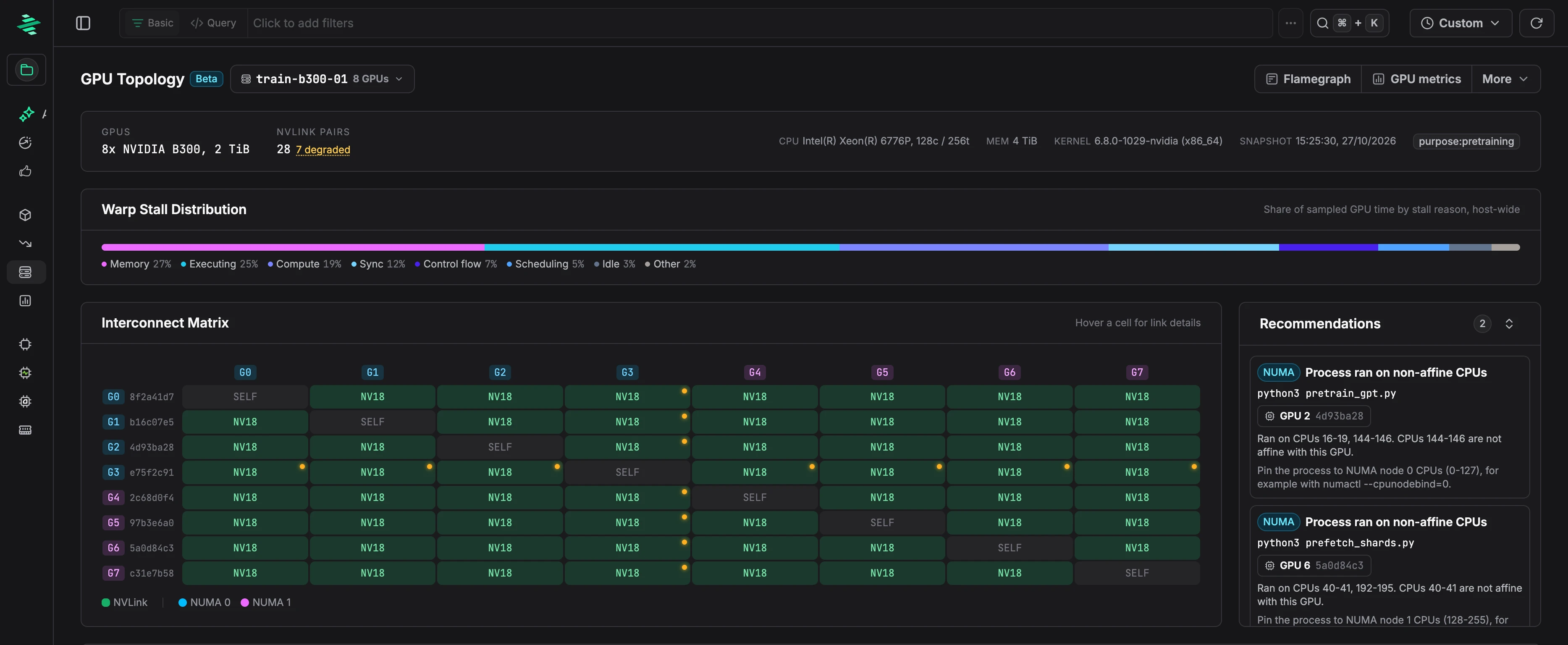
Host summary
Choose a host from the picker next to the title. The list shows each GPU host with its GPU model, GPU memory, and cluster.
The summary shows the GPUs, the number of NVLink pairs and how many are degraded, the CPU, memory, kernel version, and the host's tags.
Warp Stall Distribution
This bar shows the share of sampled GPU time spent in each stall reason across all GPUs on the host, such as memory, compute, or synchronization.
Interconnect Matrix
The matrix shows the connection between every pair of GPUs, using nvidia-smi topo -m notation: NV1 to NV18 for the number of bonded NVLinks, or the PCIe path PIX, PXB, PHB, NODE, or SYS when there's no NVLink. GPU labels are colored by NUMA node, and degraded links are marked.
Hover over or click a cell to see the link's lanes, TX and RX throughput, speed, and error rates: Flit CRC errors, replay errors, and link recoveries.
Reading the matrix
NV18means the pair has 18 bonded NVLinks, not that they're healthy. Check the cell's error rates and throughput.- One degraded pair usually points to a single link. Degraded links across one GPU's whole row and column point to that GPU's port, cable, or switch path.
- A clean matrix with slow collectives points back to the workload. Check its profile.
- A
SYSpath or rising link errors point to the node. Fix the hardware before tuning code.
Recommendations
Zymtrace lists topology problems found on the host, each with a fix:
- NUMA placement: when a process runs on CPUs that aren't on the same NUMA node as its GPU, Zymtrace shows which CPUs it used and how to pin it to the right node with
numactl. - Interconnect: when a link degrades or a GPU pair falls back to PCIe, Zymtrace names the affected GPU and its peers, and the next step, such as draining the node, reseating a link, or rechecking with
nvidia-smi topo -m.
NUMA Topology & GPU Details
GPUs are grouped by NUMA node, with the CPU threads and memory of each node. Click a GPU to expand it:
- Device metadata: UUID, framebuffer, NUMA node, NUMA-affine CPU threads, and NVLink lanes and version.
- Live metrics: utilization, memory used, power, temperature, and SM and memory clocks.
- Workload bottlenecks: stall reasons for the GPU's top kernels.
- Device health: ECC errors, retired pages, row remapping, XID errors, and PCIe error counters.
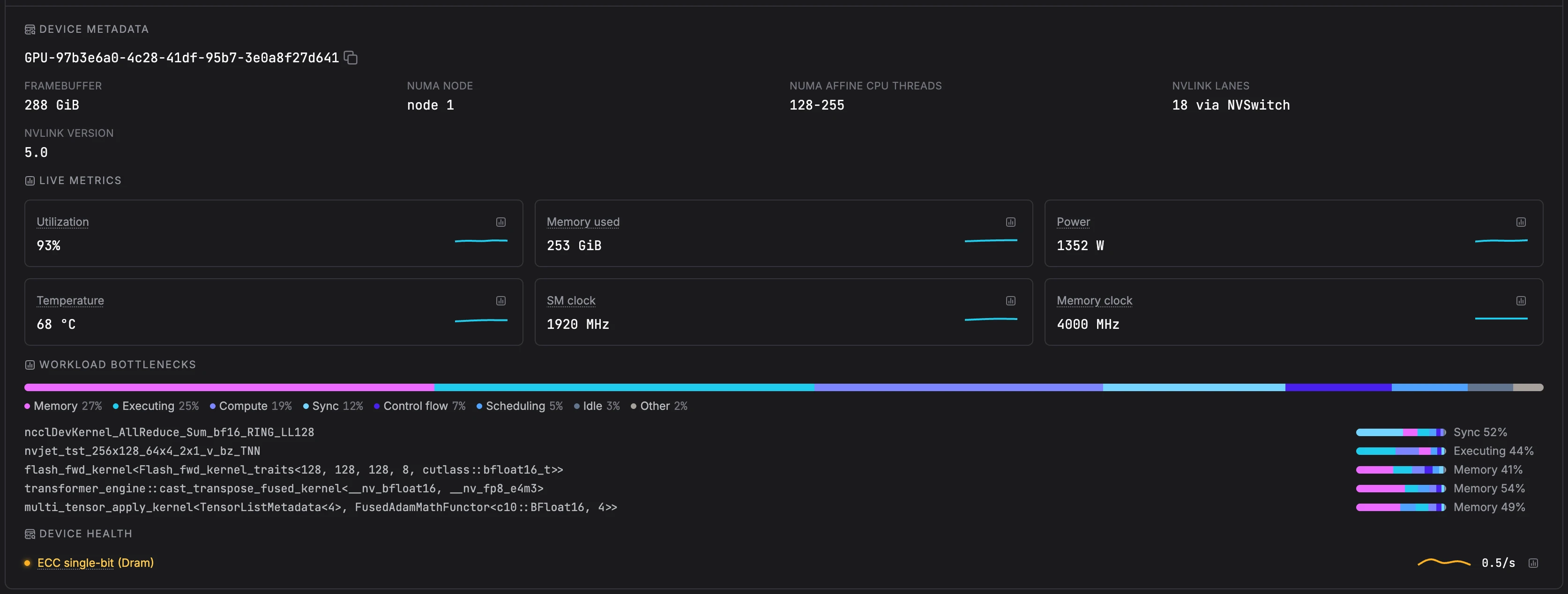
Each GPU links to its CUDA flamegraph, CUDA top functions, and GPU metrics. Use More for the host's health metrics, CPU flamegraph, and CPU and CUDA top functions.
For background and examples, see the blog post GPU Topology Health: Zymtrace Adds the Missing Hardware Layer.